Salesforce Connector Best Practices
Last updated: December 17, 2025
How to quickly update field-level permissions
We recognize it can be tedious to update field-level security on each field - particularly when you have a lot of fields.
The most efficient way to update all the fields is to open each one in a new tab in your browser. Then you can quickly go tab to tab and adjust the settings.
Additionally, if you sort by Field Name, you can easily locate all the fields from Intricately because they have 'Ily' as a prefix.
How to track changes to the data such as spend changing or a product changing
Recommended Reports
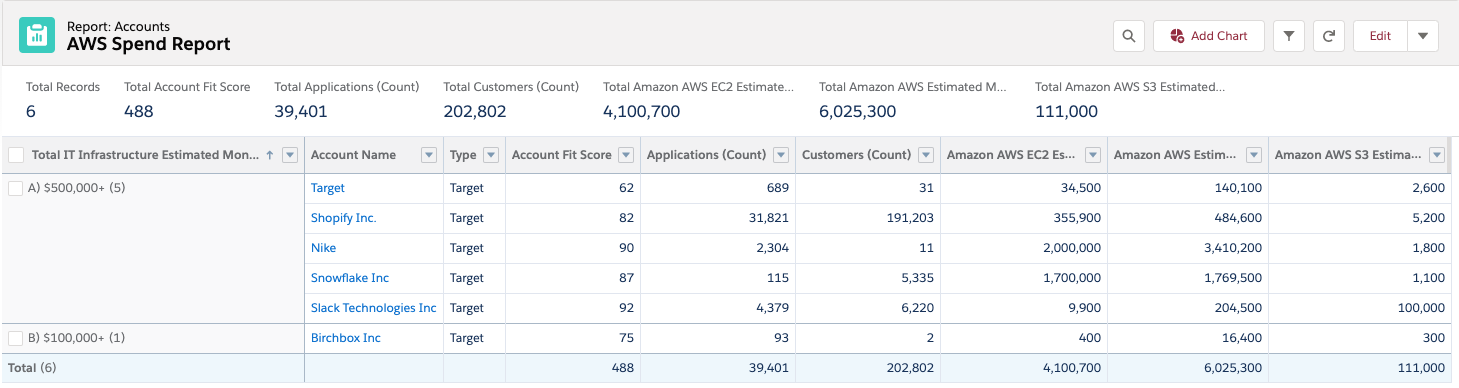
Once our data is syncing, you can interact with our fields in the same manner as any other field. Salesforce reports can be a useful way to view:
- Competitor adoption within your database
- Spend Tiers
Sample Report:
Recommended Page Layouts
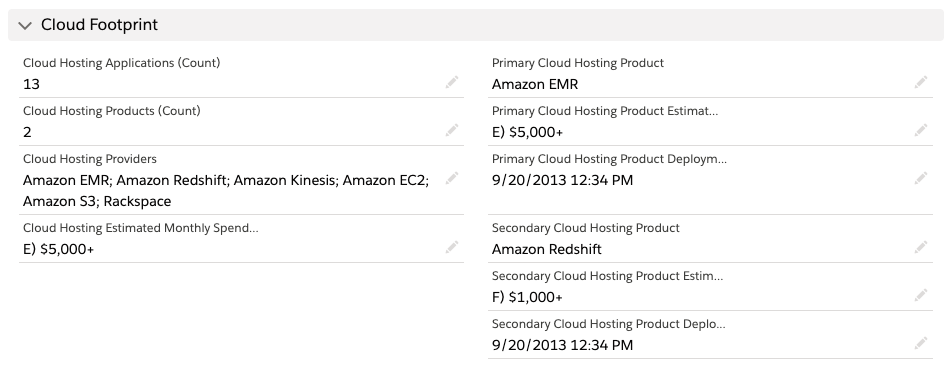
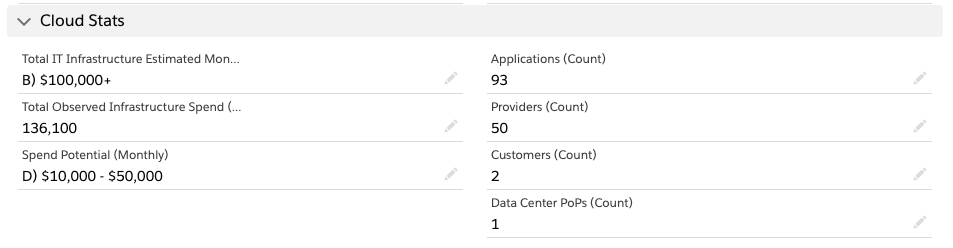
Once our data is syncing, you can interact with our fields in the same manner as any other field. A few layouts that our customers use:

How to add fields at a later date
You can add or remove any field in the future by visiting the SFDC connector settings, and clicking the "Add Fields" button.
You will need to update the Field-Level Permissions per the Salesforce Connector Installation Guide.